五、TacoAI 应用
系统自带测试命令和测试资源,测试资源位于 /usr/testdata 目录下:
root@taco-mes20:~# ls /usr/testdata/
automation  gmac       otp               sound                tps_pipeline
deb         libcv      performance_test  spi_iic_tests        vdec
distro      multicore  periphery_tests   suspend              venc
dvfs        npu        pyserial_tests    taco-pipeline-1.0.0
5.1 编码
视频编码测试命令是 taco_venc_simple_example,主要用于将 YUV 数据编码成 H.264 数据。测试资源为 /usr/testdata/venc/1920x1080_420p_10f.yuv(10 帧,1080P,YUV420p 格式数据)。使用说明如下:
taco_venc_simple_example encode <线程数> <编码周期> <循环次数> <帧数> <保存文件>
参数说明:
encode:指定编码操作线程数:指定用于编码的线程数量编码周期:每个线程编码操作的周期数循环次数:每个周期中要编码的循环次数帧数:每个循环中要编码的帧数保存文件:是否将编码后的文件保存到磁盘
示例命令:
root@taco-mes20:~# taco_venc_simple_example encode 4 1 1 10 1
NOTE: Using useExternal=1 (direct buffer access) for encoding test
TACO VENC Multi-threaded Test Configuration:
  Threads: 4
  Encoder cycles: 1
  Loops per encoder: 1
  Frames per loop: 10
  Save file: yes
  Total frames per thread: 10
Thread 0 - Cycle 1 - Loop 1: FPS: 60.83, Frames: 10, Streams: 10
Thread 0: Completed
Thread 3 - Cycle 1 - Loop 1: FPS: 60.10, Frames: 10, Streams: 10
Thread 1 - Cycle 1 - Loop 1: FPS: 60.67, Frames: 10, Streams: 10
Thread 1: Completed
Thread 3: Completed
Thread 2 - Cycle 1 - Loop 1: FPS: 57.51, Frames: 10, Streams: 10
Thread 2: Completed
All threads completed
输出文件为 output_thread_x.h264:
root@taco-mes20:~# ls
a.out    da_pec_u0             output_thread_2.h264    test
core     output_thread_0.h264  output_thread_3.h264    test.c
da_gc_u  output_thread_1.h264  regress97_riscv.tar.gz
输出日志解析:
- 编码配置:显示多线程编码的配置信息,包括线程数、编码周期、循环次数和帧数。
TACO VENC Multi-threaded Test Configuration:
  Threads: 4
  Encoder cycles: 1
  Loops per encoder: 1
  Frames per loop: 10
  Save file: yes
  Total frames per thread: 10
- 编码性能:显示每个线程在每个周期和循环中的编码帧率(FPS)和处理的帧数。
Thread 0 - Cycle 1 - Loop 1: FPS: 60.83, Frames: 10, Streams: 10
Thread 3 - Cycle 1 - Loop 1: FPS: 60.10, Frames: 10, Streams: 10
Thread 1 - Cycle 1 - Loop 1: FPS: 60.67, Frames: 10, Streams: 10
Thread 2 - Cycle 1 - Loop 1: FPS: 57.51, Frames: 10, Streams: 10
- 编码完成:所有线程编码完成后的提示。
All threads completed
5.2 解码
视频解码测试命令是 ppvdec,主要用于将 H.264、H.265 或 JPEG 数据解码成 YUV 或 RGB 数据。测试资源位于 /usr/testdata/vdec 目录下。使用说明如下:
ppvdec decode_mode <线程数> <循环次数> <解码周期> <帧数> <保存文件> [解码类型] [分辨率] [PP模式]
参数说明:
线程数:解码线程数量(1-32)循环次数:外层循环数量解码周期:每个线程的解码循环数量帧数:每轮循环需要解码的帧数保存文件:1 = 保存 YUV 文件,0 = 不保存解码类型:0 = H.264,1 = H.265(可选参数,默认值为 0)分辨率:0 = 1080p,1 = 4K(可选参数,默认值为 0)PP模式:0 = 仅 PP0,1 = 仅 PP1,2 = 双通道(可选参数,默认值为 0)
示例命令:
root@taco-mes20:~# ppvdec decode_mode 1 1 1 10 1 0 0
=== Decode Mode Test ===
Thread count: 1, Loop: 1, Frames: 10
Starting single decode thread (no pthread)...
Thread 1 - PP Channel Configuration: mode=0, ch0=enabled, ch1=disabled
Thread 1 - Parsing stream file: /usr/testdata/vdec/stream_1920x1080.h264
Parsing H.264/AVC format
Parsed 200 frames from video file
Thread 1 - Saved first decode frame 0 to decode_output_frame_0000.yuv

=== Thread 1 Decode Performance ===
Total frames decoded: 10
Hardware decode time: 0.042 seconds
Total thread time: 0.356 seconds
Hardware FPS: 238.07 frames/second
Overall FPS: 28.07 frames/second
Hardware efficiency: 11.8%
======================================
输出日志解析:
- 解码线程配置:显示每个线程的配置信息,包括模式和通道状态。
Thread 1 - PP Channel Configuration: mode=0, ch0=enabled, ch1=disabled
Thread 1 - Parsing stream file: /usr/testdata/vdec/stream_1920x1080.h264
- 帧解析:显示从视频文件中解析的帧数。
Total frames decoded: 10
- 解码性能:显示每个线程的解码帧率(FPS)。
Hardware FPS: 238.07 frames/second
Overall FPS: 28.07 frames/second
5.3 NPU 模型运行
本例程基于官方 YOLO11 模型,经过优化和适配,可在 AIBOX 硬件平台上高效运行,用于实现对 80 种常见物体的实时检测。本例程提供的预编译模型为 UINT8 量化模型(.nb 格式),旨在平衡检测精度与推理速度。项目代码通过 taRuntime 加载并执行 .nb 模型,利用 OpenCV 进行图像的预处理和后处理。
5.3.1 测试环境准备
准备一台 PC 作为 host 机,并配备 Ubuntu 系统和 Python 环境。AIBOX 平台作为 device 机,已预装 Ubuntu 系统和 SDK。
访问 Model Zoo 官方 Gitee 或 Model Zoo 官方 Github,下载官方提供的算法示例。
以 YOLO11 模型为例,通过运行 samples/YOLO11/scripts/ 目录下的 download.sh 脚本,获取例程所需的模型、数据与脚本等内容。
chmod +x download.sh && ./download.sh
下载内容:
models/
├── datasets.txt
├── yolo11s_float16.nb
├── yolo11s.onnx
├── yolo11s_int8.nb
├── yolo11s_config_fp16.json
└── yolo11s_config_int8.json
test_images/  # 测试用图片
├── input1.jpg
├── input2.jpg
├── input3.jpg
├── input4.jpg
└── input5.jpg
datasets/
├── val2017_1000  # coco val2017中随机抽取的1000张样本
└── instances_val2017_1000.json # coco val2017中随机抽取的1000张样本对应的标注信息
通过TACO SDK搭建交叉编译环境,使用交叉编译工具链编译生成可执行文件yolo11s_det_soc:
cd cpp
mkdir build && cd build
cmake ..
make
在 AIBOX 板端新建模型文件夹 yolo11,并通过 scp 命令将数据从 host 机复制到该目录下,复制完成后 yolo11 目录结构如下:
yolo11
├── test_images    # 测试集图片
│   ├── input1.jpg
├── models
│   └── yolo11s_int8.nb   # .nb 模型
|   └── yolo11s_float16.nb
└── yolo11s_det_soc # 例程程序
5.3.2 单图推理
YOLO11s UINT8 模型
在 yolo11 目录下运行 UINT8 模型:
root@taco-mes20:~/yolo11# ./yolo11s_det_soc --input=test_images/input1.jpg --model=models/yolo11s_int8.nb
output.jpg
--------------------------------------
TACO Model: models/yolo11s_int8.nb
Input Image: test_images/input1.jpg
Output Image: output.jpg
Repeat count: 10
Input size: 640 x 640
--------------------------------------
input num is : 1, output num is : 3
Tensor Attribute:
  index: 0
  dim_count: 4
  dim_size: [640, 640, 3, 1]
  data_format: 2
  quant_format: 2
  quant_data (dfp):
    fixed_point_pos: 998277249
  quant_data (affine):
    tf_scale: 0.003922
    tf_zero_point: 0
  name: input/output[0]
Tensor Attribute:
  index: 0
  dim_count: 3
  dim_size: [6400, 144, 1]
  data_format: 2
  quant_format: 2
  quant_data (dfp):
    fixed_point_pos: 1041255070
  quant_data (affine):
    tf_scale: 0.140910
    tf_zero_point: 152
  name: uid_5_out_0
Tensor Attribute:
  index: 1
  dim_count: 3
  dim_size: [1600, 144, 1]
  data_format: 2
  quant_format: 2
  quant_data (dfp):
    fixed_point_pos: 1042572834
  quant_data (affine):
    tf_scale: 0.160546
    tf_zero_point: 182
  name: uid_4_out_0
Tensor Attribute:
  index: 2
  dim_count: 3
  dim_size: [400, 144, 1]
  data_format: 2
  quant_format: 2
  quant_data (dfp):
    fixed_point_pos: 1044595452
  quant_data (affine):
    tf_scale: 0.190685
    tf_zero_point: 195
  name: uid_3_out_0
>>>>>>>>>>>>>>> model init done. <<<<<<<<<<<<<<
>>>>>>>>>>>>>>> inference done. <<<<<<<<<<<<<<
--------------------------------------
Repeat 10 times, avg time 8.90 ms
Min time: 8.73 ms, Max time: 9.64 ms
--------------------------------------
 2:  67%, [ 496,  340,  516,  359], car
 2:  67%, [ 504,  367,  522,  392], car
 2:  64%, [ 460,  439,  483,  474], car
 2:  50%, [ 566,  306,  588,  319], car
 2:  50%, [ 555,  282,  576,  298], car
 3:  46%, [ 639,  358,  656,  381], motorcycle
 2:  46%, [ 507,  403,  530,  430], car
 2:  46%, [ 783,  310,  808,  326], car
 2:  43%, [ 840,  318,  854,  335], car
 2:  33%, [ 476,  301,  490,  321], car
 2:  30%, [ 296,  338,  315,  353], car
 2:  30%, [ 451,  270,  468,  287], car
 3:  27%, [ 468,  376,  486,  396], motorcycle
opencv imread time: 99.09 ms
pre processing time: 15.85 ms
post processing time: 7.44 ms
输出日志解析:
- 使用模型:models/yolo11s_int8.nb
- 输入图像:test_images/input1.jpg(input1.jpg 可换成自定义 jpg 文件)
- 输出图像:output.jpg
- 输入图像的尺寸:640x640 像素
- 检测过程重复了 10 次,平均耗时 8.90 毫秒,最短时间:8.73 毫秒,最长时间:9.64 毫秒
- 检测结果:
- 汽车(car):
- 置信度 67%,坐标 [496, 340, 516, 359]
- 置信度 67%,坐标 [504, 367, 522, 392]
- 置信度 64%,坐标 [460, 439, 483, 474]
- 置信度 50%,坐标 [566, 306, 588, 319]
- 置信度 50%,坐标 [555, 282, 576, 298]
- 置信度 46%,坐标 [639, 358, 656, 381]
- 置信度 46%,坐标 [507, 403, 530, 430]
- 置信度 46%,坐标 [783, 310, 808, 326]
- 置信度 43%,坐标 [840, 318, 854, 335]
- 置信度 33%,坐标 [476, 301, 490, 321]
- 置信度 30%,坐标 [296, 338, 315, 353]
- 置信度 30%,坐标 [451, 270, 468, 287]
- 摩托车(motorcycle):
- 置信度 27%,坐标 [468, 376, 486, 396]
- 汽车(car):
- OpenCV imread 时间:99.09 毫秒,预处理时间:15.85 毫秒,后处理时间:7.44 毫秒
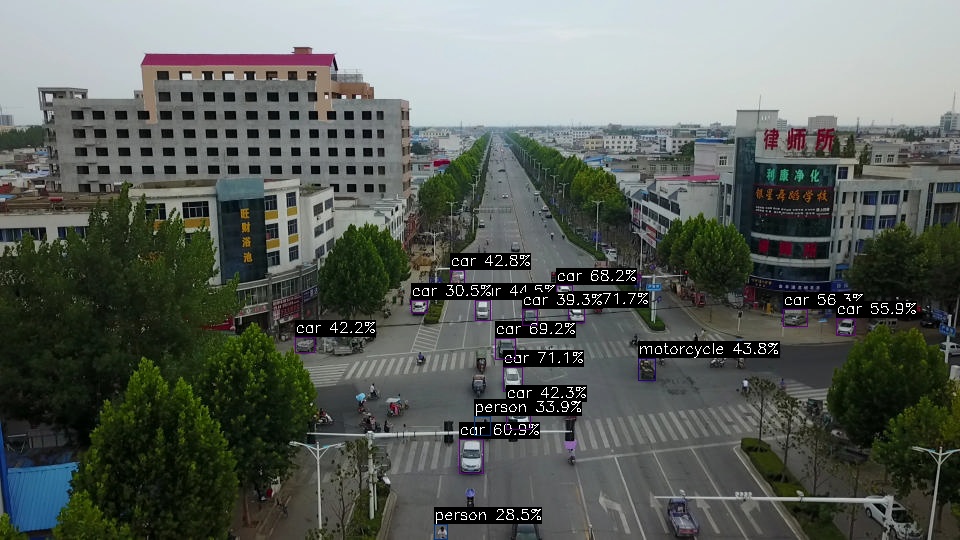
生成结果

YOLO11s FP16 模型
在 yolo11 目录下运行 FP16 模型:
root@taco-mes20:~/yolo11# ./yolo11s_det_soc --input=test_images/input1.jpg --model=models/yolo11s_float16.nb
output.jpg
--------------------------------------
TACO Model: models/yolo11s_float16.nb
Input Image: test_images/input1.jpg
Output Image: output.jpg
Repeat count: 10
Input size: 640 x 640
--------------------------------------
input num is : 1, output num is : 3
Tensor Attribute:
  index: 0
  dim_count: 4
  dim_size: [640, 640, 3, 1]
  data_format: 1
  quant_format: 0
  quant_data (dfp):
    fixed_point_pos: 0
  quant_data (affine):
    tf_scale: 0.000000
    tf_zero_point: 0
  name: input/output[0]
Tensor Attribute:
  index: 0
  dim_count: 3
  dim_size: [6400, 144, 1]
  data_format: 1
  quant_format: 0
  quant_data (dfp):
    fixed_point_pos: 0
  quant_data (affine):
    tf_scale: 0.000000
    tf_zero_point: 0
  name: uid_5_out_0
Tensor Attribute:
  index: 1
  dim_count: 3
  dim_size: [1600, 144, 1]
  data_format: 1
  quant_format: 0
  quant_data (dfp):
    fixed_point_pos: 0
  quant_data (affine):
    tf_scale: 0.000000
    tf_zero_point: 0
  name: uid_4_out_0
Tensor Attribute:
  index: 2
  dim_count: 3
  dim_size: [400, 144, 1]
  data_format: 1
  quant_format: 0
  quant_data (dfp):
    fixed_point_pos: 0
  quant_data (affine):
    tf_scale: 0.000000
    tf_zero_point: 0
  name: uid_3_out_0
>>>>>>>>>>>>>>> model init done. <<<<<<<<<<<<<<
>>>>>>>>>>>>>>> inference done. <<<<<<<<<<<<<<
--------------------------------------
Repeat 10 times, avg time 20.83 ms
Min time: 20.53 ms, Max time: 21.59 ms
--------------------------------------
 2:  72%, [ 569,  308,  585,  323], car
 2:  71%, [ 503,  367,  522,  391], car
 2:  69%, [ 495,  339,  516,  359], car
 2:  68%, [ 556,  285,  572,  299], car
 2:  61%, [ 460,  440,  483,  474], car
 2:  56%, [ 783,  310,  807,  326], car
 2:  56%, [ 837,  319,  855,  336], car
 2:  44%, [ 476,  301,  491,  321], car
 3:  44%, [ 639,  358,  656,  380], motorcycle
 2:  43%, [ 451,  271,  465,  287], car
 2:  42%, [ 507,  403,  530,  430], car
 2:  42%, [ 296,  338,  315,  353], car
 2:  39%, [ 472,  376,  486,  395], car
 2:  35%, [ 512,  516,  542,  540], car
 2:  33%, [ 667,  496,  698,  538], car
 2:  33%, [ 615,  271,  632,  282], car
 2:  33%, [ 892,  302,  925,  321], car
 2:  32%, [ 509,  239,  523,  253], car
 2:  31%, [ 411,  303,  426,  316], car
 2:  30%, [ 521,  306,  536,  325], car
 2:  29%, [ 558,  400,  579,  452], car
 2:  28%, [ 442,  419,  455,  443], car
opencv imread time: 99.07 ms
pre processing time: 15.83 ms
post processing time: 7.45 ms
输出日志解析:
- 使用模型:models/yolo11_float16.nb
- 输入图像:test_images/input1.jpg(input1.jpg 可换成自定义 jpg 文件)
- 输出图像:output.jpg
- 输入图像的尺寸:640x640 像素
- 检测过程重复了 10 次,平均耗时 20.83 毫秒,最短时间:20.53 毫秒,最长时间:21.59 毫秒
- 检测结果:
- 汽车(car):
- 置信度 72%,坐标 [569, 308, 585, 323]
- 置信度 71%,坐标 [503, 367, 522, 391]
- 置信度 69%,坐标 [495, 339, 516, 359]
- 置信度 68%,坐标 [556, 285, 572, 299]
- 置信度 61%,坐标 [460, 440, 483, 474]
- 置信度 56%,坐标 [783, 310, 807, 326]
- 置信度 56%,坐标 [837, 319, 855, 336]
- 置信度 44%,坐标 [476, 301, 491, 321]
- 置信度 43%,坐标 [451, 271, 465, 287]
- 置信度 42%,坐标 [507, 403, 530, 430]
- 置信度 42%,坐标 [296, 338, 315, 353]
- 置信度 39%,坐标 [472, 376, 486, 395]
- 置信度 35%,坐标 [512, 516, 542, 540]
- 置信度 33%,坐标 [667, 496, 698, 538]
- 置信度 33%,坐标 [615, 271, 632, 282]
- 置信度 33%,坐标 [892, 302, 925, 321]
- 置信度 32%,坐标 [509, 239, 523, 253]
- 置信度 31%,坐标 [411, 303, 426, 316]
- 置信度 30%,坐标 [521, 306, 536, 325]
- 置信度 29%,坐标 [558, 400, 579, 452]
- 置信度 28%,坐标 [442, 419, 455, 443]
- 摩托车(motorcycle):
- 置信度 44%,坐标 [639, 358, 656, 380]
- 汽车(car):
- OpenCV imread 时间:99.07 毫秒,预处理时间:15.83 毫秒,后处理时间:7.45 毫秒
生成结果
5.3.3 模型性能评测
基于单图推理测试结果,我们对四个模型进行了性能对比分析:
性能对比表格
| 模型名称 | 输入图像 | 输出图像 | 平均推理时间(ms) | 最小推理时间(ms) | 最大推理时间(ms) | OpenCV读取时间 (ms) | 预处理时间 (ms) | 后处理时间 (ms) |
|---|---|---|---|---|---|---|---|---|
| YOLO11s UINT8 | input1.jpg | output.jpg | 8.90 | 8.73 | 9.64 | 99.09 | 15.85 | 7.44 |
| YOLO11s FP16 | input1.jpg | output.jpg | 20.83 | 20.53 | 21.59 | 99.07 | 15.83 | 7.45 |
性能分析
检测准确性分析:
- FP16 精度更高:FP16 模型在检测置信度上明显高于 UINT8 模型
推理速度对比:
- UINT8 模型显著更快:UINT8 模型的推理速度是 FP16 模型的 2 倍以上
总结
- FP16 模型在检测精度上有明显优势,适用于对准确性要求更高的场景
- UINT8 量化在速度上更优,是实时应用的首选
- 用户应根据具体应用场景在速度和精度之间进行权衡